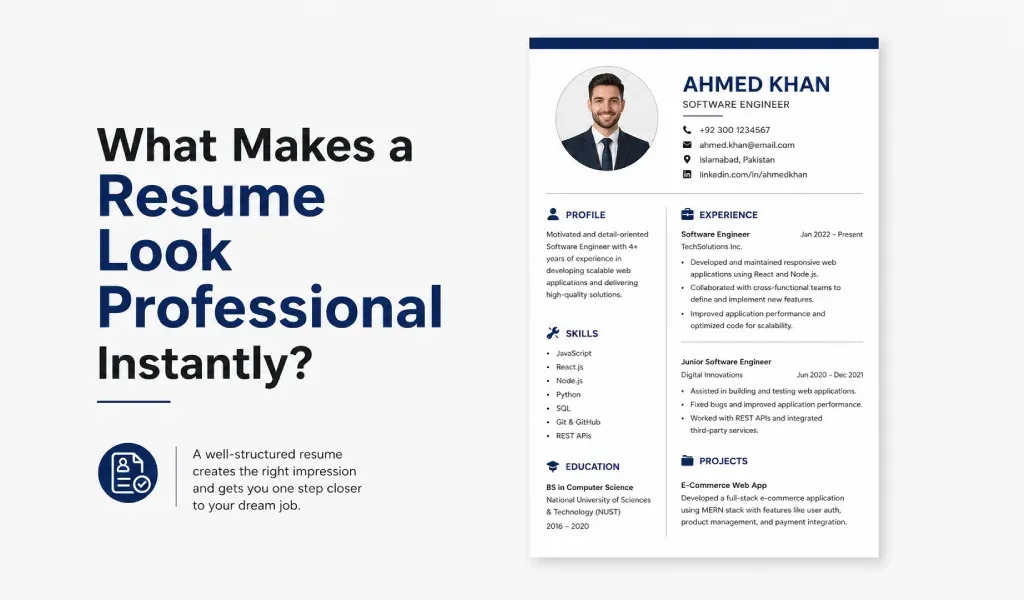
A professional resume can make a strong first impression before a recruiter reads a single word.
Most hiring managers spend only a few seconds scanning a resume. In that short time, they decide whether to continue reading or move to the next applicant.
So what makes a resume look professional instantly?
The answer is not complicated. A few simple elements can make your resume stand out and appear more credible, organized, and job-ready.
Clean Layout
The first thing recruiters notice is the layout.
A professional resume should look clean and easy to read. Avoid crowded sections, excessive colors, and decorative fonts.
Use:
- Clear headings
- Consistent spacing
- Simple fonts
- Organized sections
A clean resume format makes information easier to scan. It also shows attention to detail.
Strong Resume Header
Your resume header should be clear and professional.
Include:
- Full name
- Phone number
- Email address
- Location
- LinkedIn profile (optional)
Avoid unprofessional email addresses.
A strong header immediately creates a professional impression.
Clear Professional Summary
Many job seekers skip the summary section.
That is a mistake.
A short resume summary helps recruiters understand who you are and what value you bring.
For example:
"Marketing graduate with experience in social media management, content creation, and digital advertising. Passionate about helping brands grow through data-driven marketing strategies."
Keep it short. Keep it relevant.
Relevant Skills Section
Recruiters often look for skills before reading the entire resume.
Create a dedicated skills section that highlights your strongest abilities.
Examples:
- Project Management
- Communication Skills
- Data Analysis
- Graphic Design
- Customer Service
- Software Development
Use skills that match the job description whenever possible.
This also helps your resume pass Applicant Tracking Systems (ATS).
Professional Work Experience
Work experience is one of the most important sections of a resume.
Instead of listing responsibilities, focus on achievements.
Bad example:
- Managed social media accounts.
Better example:
- Increased social media engagement by 45% within six months.
Numbers attract attention. They make your accomplishments more believable.
Consistent Formatting
Formatting mistakes can instantly make a resume look unprofessional.
Check:
- Font sizes
- Bullet styles
- Alignment
- Margins
- Date formats
Consistency creates a polished appearance.
Even small formatting issues can distract recruiters.
Use Keywords Naturally
Modern companies use ATS software to filter resumes.
That means your resume should include relevant keywords.
Examples include:
- Resume builder
- Professional resume
- Resume template
- Resume format
- Cover letter
- Job application
- Resume summary
- Work experience
- Skills section
- ATS-friendly resume
- Resume for freshers
- Resume for experienced professionals
Use keywords naturally. Never stuff them unnecessarily.
Keep It Relevant
A professional resume focuses on information related to the target role. Remove outdated skills and irrelevant details. Every section should support your job application. Less clutter often creates a stronger resume.
Don't Ignore the Cover Letter
A professional resume becomes even more powerful when paired with a strong cover letter.
Many candidates submit resumes without a cover letter.
That gives you an opportunity to stand out.
A personalized cover letter helps explain:
- Why you want the role
- Why you are qualified
- What value you can bring
Recruiters often appreciate candidates who take the extra step.
Create Professional Documents Faster with AI
Creating a polished resume and cover letter from scratch can take hours.
This is where AI can help.
Cover Letter AI & Resume Maker helps job seekers create professional resumes and personalized cover letters in minutes.
Whether you are:
- A student
- A fresh graduate
- A job seeker
- A freelancer
- An experienced professional
The app can help you generate high-quality application documents quickly.
Features include:
- AI Resume Builder
- AI Cover Letter Generator
- Professional Resume Templates
- ATS-Friendly Resume Formats
- Resume PDF Export
- Cover Letter Writing Assistance
- Easy Resume Editing
Instead of struggling with formatting and wording, you can focus on applying for the right opportunities.
Common Resume Mistakes
Avoid these common mistakes:
- Spelling errors
- Poor formatting
- Generic summaries
- Missing keywords
- Long paragraphs
- Unprofessional email addresses
- Irrelevant information
Even one mistake can reduce your chances of getting an interview.
Final Thoughts
A professional resume does not need flashy graphics or complicated designs.
It needs clarity.
A clean layout, strong summary, relevant skills, measurable achievements, and ATS-friendly formatting can instantly improve how recruiters view your application.
Pair your resume with a well-written cover letter, and you increase your chances of standing out in a competitive job market.
If you want to create professional job application documents faster, tools like Cover Letter AI & Resume Maker can help you build polished resumes and cover letters in just a few minutes.