 Cover Letter AI & Resume Maker
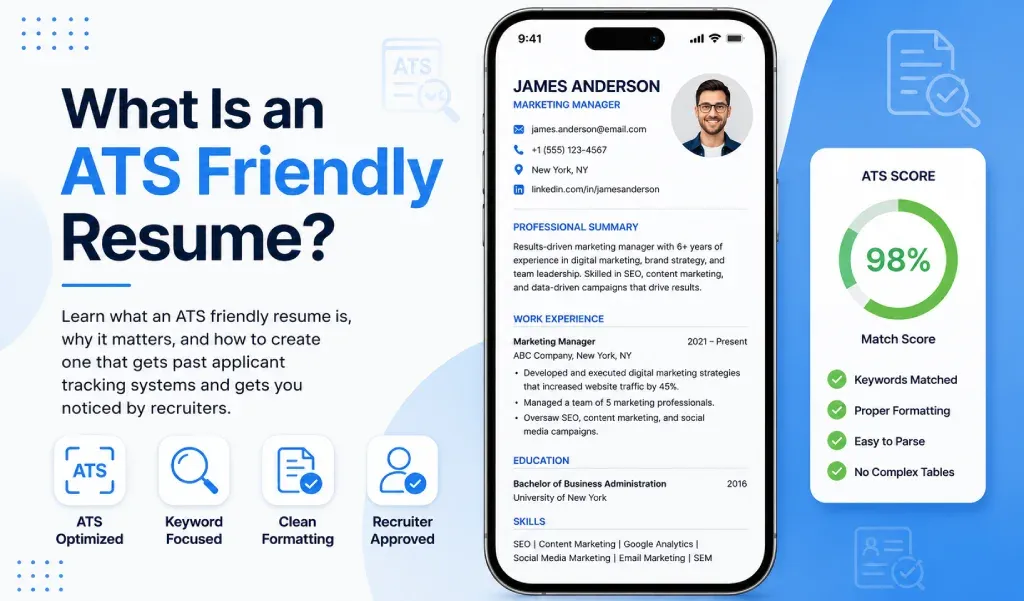
An ATS-friendly resume is one that applicant tracking software can read accurately: a single-column layout, standard headings, plain text in a standard font, contact details in the body and keywords used in context. Below are the rules, a safe structure, three myths corrected and a copy-and-paste test you can run in two minutes.
Examples use fictional details. Sources disagree on a few points, and we note where.
Key Takeaways
- An ATS stores and parses applications so recruiters can search and review them. It does not read a page the way a person does.
- Use one column, standard headings, a standard font and a text-based file, and keep contact details out of headers and footers.
- Put keywords in context in your bullets, not only in a skills list.
- Sources differ on PDF versus Word, so follow the posting and export a text-based file.
- Write for software and for people, because a recruiter or hiring manager still reads the resume.
What Is an ATS, and What Does It Do With Your Resume?
An applicant tracking system (ATS) is software employers use to collect, store and sort applications. Workable describes resume parsing as the process by which technology extracts data from resumes, such as name, email, degrees, skills and work experience. Ohio Northern University's career guide says employers use these systems to pre-screen large numbers of applicants, and that the system reads and categorizes resume content for its database.
When the parser misreads your layout, details can land in the wrong field or go missing. Greenhouse, one widely used system, says parse failures happen only occasionally and attributes them to missing information, non-standard file types and characters the parser does not recognize. Its candidate FAQ adds that parsing can make mistakes, so review any details it fills in before you submit.
What Are the ATS-Friendly Resume Rules?
| Rule | Why it helps |
|---|---|
| Use one column, left-aligned, with no tables or text boxes | Workable says tables and columns can put words on different lines. UNC and Ohio Northern also advise avoiding them |
| Use standard headings such as Summary, Experience, Education and Skills | Ohio Northern lists standard headings, and UNC suggests bold headings such as EXPERIENCE and EDUCATION |
| Put contact details in the body, not the header or footer | Workable says headers and footers often get mixed into the main text. Ohio Northern and UNC give similar advice |
| Use a standard font at 10 to 12 point | UNC lists Arial, Calibri and Times New Roman. Ohio Northern suggests 11 to 12 point |
| Keep text out of images and graphics | Workable found that a name inside an image banner was lost after text extraction |
| Use the same structure for every job, newest first | Ohio Northern advises consistent entries and dates placed right after the related text |
| Spell out terms with the abbreviation in parentheses | Ohio Northern gives "Certified Public Accountant (CPA)" as an example |
| Proofread | Ohio Northern notes the system will not recognize misspellings |
For font, margin and spacing details beyond ATS, see our guide to a professional resume layout.
Want a starting layout? Cover Letter AI & Resume Maker has several resume templates and fonts for iPhone and iPad. Enter your own details and export a PDF.
How Do You Use Keywords Without Stuffing?
Take terms from the job description and use them in context. Ohio Northern advises putting keywords inside achievement bullets, using the exact job title you are seeking and listing only skills you can document. West Virginia University's career center adds that a keyword-filled skills section alone is not enough.
Before: Skills: sales, selling, sales skills, salesperson
After: Closed [number] new accounts in business software sales by running demos and following up within [time].
For skills formatting, see how to show skills on a resume. To adapt one resume to many postings, see how to tailor your resume with AI.
What Does a Safe ATS-Friendly Structure Look Like?
FIRST LAST
City, State | Phone | Email | LinkedIn URL

SUMMARY
Two to three lines: role, focus, proof.

SKILLS
Category: skill, skill, skill

EXPERIENCE
Job Title, Employer, City, State, Month Year to Month Year
- Action verb + task + result, using terms from the posting
- Different action verb + task + result

EDUCATION
Degree, School, Year

CERTIFICATIONS (optional)
Name, Issuer, Year
For the full walk-through, see how to write a resume.
Which ATS Myths Are Wrong?
Myth 1: An ATS automatically rejects most resumes. The evidence is mixed but leans the other way. In a study by the resume company Enhancv, reported by The HR Gazette on November 11, 2025, 2 of 25 U.S. recruiters said they configure content-based auto-rejection. The rest reject manually or through knockout questions alone. Greenhouse says its candidate-matching AI does not automatically advance or reject candidates. A sample of 25 is small, and formatting errors can still hide your details. Resume Genius's 2026 report, a survey of 1,500 U.S. hiring managers, found that 58% now use AI to screen resumes and applications.
Myth 2: A PDF can never be read. Greenhouse supports .doc, .docx, .pdf, .rtf and .txt files, and its candidate FAQ suggests uploading a PDF. Workable prefers .doc or .docx but accepts a PDF exported from a word processor, not a scan. Ohio Northern discourages PDFs while noting that systems are improving. Follow the posting, and avoid scanned or image-only files.
Myth 3: Stuffing keywords gets you through. Ohio Northern advises using keywords in context, and West Virginia says a keyword-filled skills section alone is not enough. A person reads the resume too.
How Do You Run a Plain-Text Readability Test?
Tech Interview Handbook recommends a plain-text copy test to catch formatting problems. Here is one way to run it:
- Open the exact file you plan to upload.
- Select all, copy, and paste into a plain-text editor such as Notepad or TextEdit.
- Check the order: your name, your contact details, then each section.
- Look for missing words, scrambled lines, merged words or odd symbols.
- Fix the source file by removing the table, text box or image that caused the problem, and test again.
Related Reading
- How to Write a Resume in 2026: A Step-by-Step Guide: the step-by-step guide to the whole resume.
- What Makes a Resume Look Professional? 10 Quick Fixes: fonts, margins and layout fixes.
- How to Show Your Skills on a Resume (With Examples): show hard and soft skills with proof.
- How to Tailor Your Resume to a Job With AI (5 Steps): tailor one resume to many postings.
Sources: Workable, "What is resume parsing? How an ATS reads a resume" (page dated September 2023); Ohio Northern University Polar Careers, applicant tracking system resume guide; UNC Student Affairs Career Center, "UNC Resume Guide for Students"; West Virginia University Career Services Center, "How to tailor your resume to impress employers"; Greenhouse Support, supported formats and MyGreenhouse FAQ for Candidates; The HR Gazette on the Enhancv recruiter study (November 11, 2025); Resume Genius, "2026 Hiring Trends Report"; Tech Interview Handbook, resume guide.
Ready to build yours? Cover Letter AI & Resume Maker turns the details you enter into a resume draft you can edit and export. Free to download from the App Store for iPhone and iPad, with in-app purchases for some features. AI drafts can contain mistakes, so read and edit every line before you send it.
Frequently Asked Questions
What does ATS stand for? ATS stands for applicant tracking system, software employers use to collect, store and sort job applications. It parses each resume into fields such as name, skills and work history so recruiters can search and review candidates. It is a database and workflow tool, not a person reading your resume.
Do all companies use an ATS? We found no reliable count. Ohio Northern's guide says employers use one to pre-screen large numbers of applicants. Small employers may use email or a spreadsheet, so keep your resume plain either way.
Is PDF or Word better for ATS? Sources differ. Greenhouse supports both and suggests candidates upload a PDF, Workable prefers .doc or .docx but accepts a PDF exported from a word processor, and Ohio Northern discourages PDFs. Follow the posting, and avoid scanned or image-only files.
Do ATS systems automatically reject resumes? Less often than the myth suggests. In an Enhancv study of 25 U.S. recruiters, only 2 configured content-based auto-rejection. Knockout questions can still screen applicants out, and formatting errors can hide your details, so write for software and for people.
Are tables and columns bad for ATS? They carry risk. Workable says tables and columns can put words on different lines, and UNC advises avoiding graphics, tables, columns and text boxes. A single-column layout with standard headings is the safer choice.