 Cover Letter AI & Resume Maker
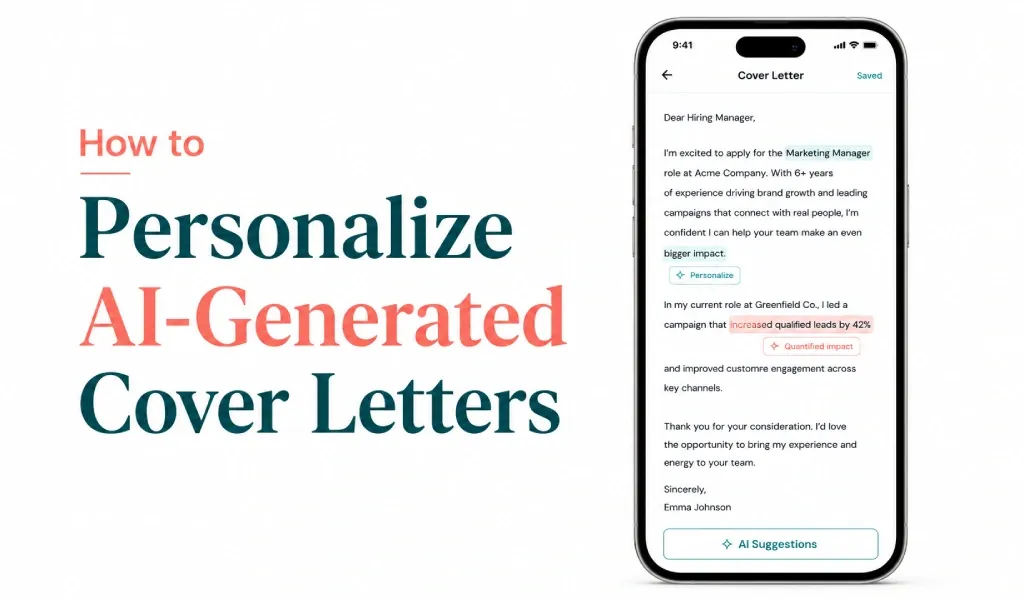
To personalize an AI-generated cover letter, start from the job description, name the hiring manager if you can find them, replace generic claims with real achievements, connect your experience to the company, and rewrite the opening line. Then read it aloud and check every fact. Those edits turn a template into your letter.
AI makes a first draft fast, but a fast draft is often generic. Here are five steps that fix that.
Key Takeaways
- Hiring managers say personalization matters. Resume Now's March 2025 report (925 respondents) found 62% say AI-generated resumes without personalization are likely to be rejected, and 78% look for personalized details as a sign of genuine fit.
- Feed the tool specifics. Forage's tests found vague prompts led to invented details, and Northern Kentucky University advises giving as much specific detail as you can.
- The five edits are: tailor to the posting, name the hiring manager, add real achievements, connect to the company, and read it aloud.
- Check every fact. AI drafts can contain mistakes, and you are responsible for every claim.
- Sending AI output unedited is the problem, not using AI. In TopResume's survey, 52% of hiring managers accepted AI for proofreading or drafting support.
Why Personalization Matters
Personalization shows genuine interest in a specific role, connects your skills to the job and gives the reader something to remember. It matters more with AI, because a default draft tends to sound like every other default draft. In Forage's tests, ChatGPT's letters were polished but generic, and one echoed the job posting back without explaining how the candidate had used those skills.
Employers are also adjusting. Robert Half's survey of more than 2,000 U.S. hiring managers, conducted in November 2025, reports that 67% of U.S. HR leaders say reviewing AI-generated applications has slowed hiring. Leaders said they spend more time reviewing applications (42%) and update job descriptions to discourage generic AI responses (32%). A letter that shows real knowledge of the role stands apart.
Step 1: Start With the Job Description
The best letters are tailored to the posting. Before you edit an AI draft, read the job post and note the required skills, experience, responsibilities and company values. Then check that the draft reflects them.
Repeating the posting's phrases is not enough, though. Forage found that a letter can echo the job post without proving the skills. Pair each requirement you mention with a real example of your own.
Where you start matters too. A tool that asks for the role, company, tone and key skills before it writes, like Cover Letter AI & Resume Maker, begins from details you supplied. You still do the remaining steps.
Step 2: Name the Hiring Manager
Many AI drafts open with "Dear Hiring Manager." That is acceptable, but a name shows effort. Check the job post, the company's careers or team page and LinkedIn. If you cannot find a name, "Dear Hiring Team" is a safe alternative. Avoid guessing, because a wrong name looks worse than a neutral greeting.
Step 3: Add Real Achievements
Recruiters want to learn about you, not about the AI. Replace generic claims with specifics: results, project outcomes, team size, certifications or recognition. The example below uses placeholders, so use only facts you can support.
- Instead of: I have excellent leadership skills.
- Write: I led a team of [number] and delivered [number] client projects [outcome you can support].
Specific examples are more credible. Dice's January 2026 article quotes recruiting experts who flag soft-skill claims with no story behind them, such as a team mindset with no example, as a warning sign.
Short on time? Enter the role, company, tone and your key skills in Cover Letter AI & Resume Maker to get a first draft, then rewrite it in your own voice.
Step 4: Connect to the Company and Rewrite the Opening
Visit the company's website and note its mission, culture, values and recent news. Pick one true point and connect it to your experience. That shows you understand the organization.
Then rewrite the opening. Many AI drafts start with a version of "I am writing to express my strong interest in the position," the default fallback we saw in our own test. Explain why you want this role instead.
- Generic: I am writing to express my strong interest in the Marketing Specialist position.
- Specific: I am applying for the Marketing Specialist role at [company] because [specific reason], and my work on [specific project] is the closest match I can offer.
Step 5: Read It Aloud and Check Every Fact
AI drafts can come out overly formal or repetitive. Read the letter aloud and ask:
- Does this sound like me?
- Is the language natural?
- Are there unnecessary buzzwords?
- Would I say this in a real conversation?
Then check every claim against your real record. Northern Kentucky University's career services warns that ChatGPT may guess at your experience or suggest numbers that do not reflect your actual results. The goal is a professional but authentic letter. For the words and patterns that make a draft look machine-written, see whether employers can tell.
Keep Your Resume and Letter Consistent
A personalized letter works best with a strong resume, and the two should tell the same story. Your skills, achievements and dates should match across both documents.
Common Mistakes to Avoid
- Copying AI output without editing it
- Using generic language or stock phrases
- Ignoring the job description
- Making the letter too long
- Repeating what your resume already says
- Using the same letter for every application
Our guide to cover letter mistakes covers these in more detail, and how to write a cover letter gives the full structure. To see what went wrong in a plain-prompt draft, read what ChatGPT got wrong.
Related Reading
- I Asked ChatGPT to Write My Cover Letter: What It Got Wrong: what a real ChatGPT cover letter got wrong.
- Can Employers Tell if a Cover Letter Was Written by AI?: what gives an AI letter away.
- How to Write a Cover Letter That Gets Noticed (Step-by-Step): the full cover letter walkthrough.
- 10 Cover Letter Mistakes to Avoid (and How to Fix Them): 10 mistakes with fixes.
Sources: Resume Now AI Applicant Report (March 2025, 925 respondents), as summarized by JobCannon Research; Forage, ChatGPT cover letter tests (published December 15, 2022; updated May 31, 2024); Northern Kentucky University Career Services, guide to using ChatGPT to improve resumes and cover letters; Robert Half, press release on AI-generated applications (March 10, 2026; survey conducted November 2025); TopResume, AI in hiring survey (fielded May 15 and 16, 2025); Dice Insights, Stop Letting AI Sabotage Your Resume (January 8, 2026). The example sentences use placeholders.
Applying to several jobs? Use Cover Letter AI & Resume Maker for each first draft, then tailor every letter to its job post. Free to download from the App Store for iPhone and iPad, with in-app purchases for some features. AI drafts can contain mistakes, so read and edit every line before you send it.
Frequently Asked Questions
How do I make an AI cover letter sound like me? Read it aloud. Replace stock phrases with words you would actually say, shorten long sentences and add one detail only you could include, such as a project, a result or why this company interests you. Then rewrite the opening line so it is not the default one.
What details should I add to personalize a cover letter? Add the hiring manager's name if you can find it, one achievement you can support with a number, and one specific reason you want this company, such as a product, value or recent project. These are the details a generic draft cannot supply.
How do I find the hiring manager's name? Check the job post, the company's careers or team page and LinkedIn. If you cannot find a name, "Dear Hiring Team" is a safe alternative. Avoid guessing, since a wrong name looks worse than a neutral greeting.
Should I tell an employer I used AI for my cover letter? Follow the employer's instructions if they mention AI. If they do not, focus on submitting a letter that is accurate and personal. You are responsible for every claim in it, however the first draft was written.
Can employers tell if my cover letter was written by AI? Sometimes. In TopResume's test, 33.5% of 600 U.S. hiring managers correctly spotted AI-generated resumes, and detection software is unreliable. Generic phrasing and missing detail give a draft away, so personalize it. Our guide on whether employers can tell covers the evidence.