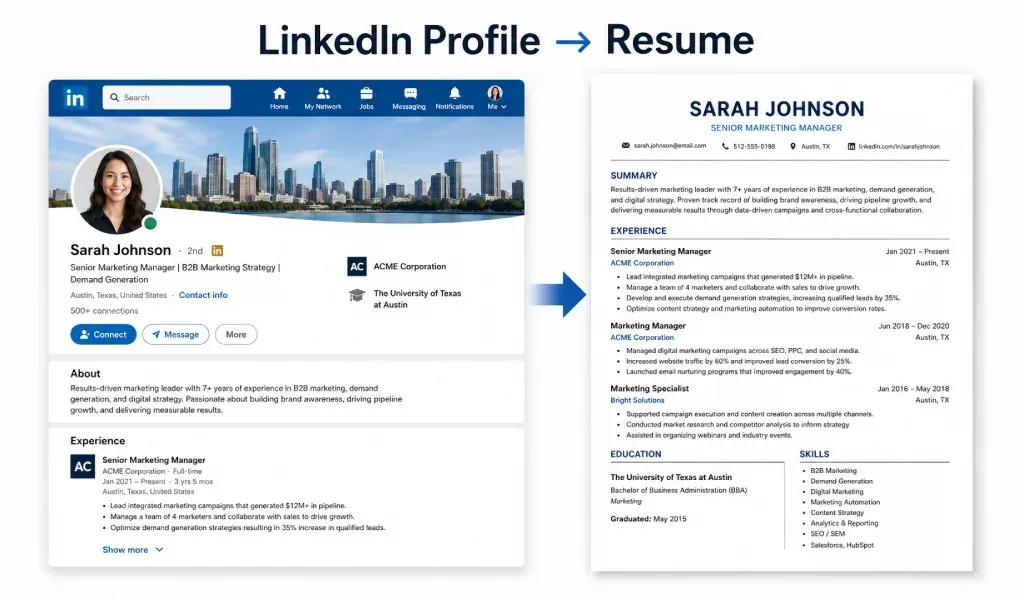
LinkedIn has become much more than a networking platform.
For many professionals, it is the most up-to-date record of their career history, skills, achievements, certifications, and work experience. In fact, many people spend more time updating their LinkedIn profiles than updating their resumes.
The good news is that you do not need to start from scratch every time you need a new resume.
If your LinkedIn profile is complete and well-maintained, it can serve as an excellent foundation for creating a professional resume.
In this guide, you will learn how to turn a LinkedIn profile into a resume that looks professional, passes ATS systems, and helps you stand out in job applications.
Why Use LinkedIn as a Resume Base?
Your LinkedIn profile already contains most of the information employers want to see.
This includes:
- Professional headline
- Work experience
- Skills
- Education
- Certifications
- Projects
- Recommendations
- Accomplishments
Instead of rewriting everything manually, you can use your LinkedIn profile as a starting point and then tailor the information for specific job applications.
This approach saves time and ensures consistency across your professional documents.
LinkedIn Profile vs Resume
Although they contain similar information, a LinkedIn profile and a resume serve different purposes.
A LinkedIn profile is designed to provide a complete picture of your professional background.
A resume is designed to help you get an interview.
That means your resume should be shorter, more focused, and more targeted toward a specific role.
Your LinkedIn profile may contain ten years of experience, while your resume may only need to highlight the most relevant achievements.
The goal is not to copy everything.
The goal is to select the most important information.
Step 1: Review Your LinkedIn Profile
Before creating a resume, review your LinkedIn profile carefully.
Check whether all sections are updated.
Look for:
- Recent job positions
- Current skills
- Certifications
- Education details
- Volunteer experience
- Professional achievements
Many people forget to update older positions or recent accomplishments.
A resume is only as strong as the information it contains.
Step 2: Start With a Professional Summary
Your LinkedIn headline can help you create a strong resume summary.
For example:
LinkedIn Headline:
"Digital Marketing Specialist | SEO Expert | Content Strategist"
Resume Summary:
"Results-driven Digital Marketing Specialist with experience in SEO, content marketing, and digital growth strategies. Proven ability to increase organic traffic and improve online visibility through data-driven campaigns."
A strong summary gives recruiters a quick understanding of your value.
Keep it concise and relevant.
Step 3: Transfer Work Experience
Your work experience section is often the most important part of your resume. LinkedIn usually contains job titles, company names, and descriptions. Do not simply copy and paste those descriptions.
Instead, focus on achievements.
For example:
Instead of:
"Managed company social media accounts."
Write:
"Increased social media engagement by 40% through targeted content strategies."
Numbers and measurable results make your resume stronger. Recruiters pay attention to impact.
Step 4: Select Relevant Skills
LinkedIn profiles often contain dozens of skills. A resume should only include the most relevant ones. Choose skills that match the job description.
Examples include:
- Project Management
- Data Analysis
- Software Development
- Customer Service
- Graphic Design
- Digital Marketing
- Leadership
- Communication
Including relevant resume keywords can also improve ATS compatibility.
Step 5: Add Certifications
Many professionals earn certifications but forget to include them on their resumes.
Your LinkedIn profile is a great place to find these credentials.
Examples include:
- Google Analytics Certification
- AWS Certification
- PMP Certification
- HubSpot Certifications
- Microsoft Certifications
Relevant certifications can help strengthen your application.
Especially in competitive industries.
Step 6: Include Education
Transfer your education details from LinkedIn. Keep the information simple.
Include:
- Degree name
- Institution
- Graduation year
Recent graduates may also include:
- Academic achievements
- Relevant coursework
- Projects
The education section should support your overall profile.
Step 7: Highlight Projects
Many recruiters care more about practical experience than job titles. Projects can help demonstrate your abilities.
LinkedIn often contains project information that can be added to your resume.
Examples:
- Mobile app development projects
- Marketing campaigns
- Website redesigns
- Data analysis projects
- Research initiatives
Include projects that relate directly to the target position.
Step 8: Optimize for ATS
Many companies use Applicant Tracking Systems (ATS) to filter resumes. An ATS-friendly resume increases your chances of reaching a recruiter.
When converting a LinkedIn profile into a resume:
- Use standard section headings
- Include job-related keywords
- Avoid complex graphics
- Use a simple resume format
- Save your resume as PDF when required
ATS optimization is one of the most important steps in modern job applications.
Step 9: Customize for Every Job
One common mistake is creating a single resume for every application. Employers want candidates who match their requirements. Review the job description carefully.
Then adjust:
- Resume summary
- Skills section
- Keywords
- Achievements
Even small adjustments can improve interview opportunities.
Common Mistakes to Avoid
Copying LinkedIn Word for Word
A LinkedIn profile and a resume have different purposes. Directly copying everything creates a long and unfocused resume. Always edit and refine.
Including Too Much Information
More information does not always mean a better resume. Focus on relevance. Recruiters appreciate clarity.
Ignoring Keywords
Modern hiring processes rely heavily on ATS software. Missing keywords can reduce visibility. Use terms that align with the target role.
Poor Formatting
Even excellent content can look unprofessional if formatting is inconsistent. Use clean layouts and readable fonts. A professional appearance matters.
How AI Can Help
Creating a resume manually can take hours. Especially when customizing it for different positions. AI tools can speed up the process significantly.
They can help:
- Generate resume summaries
- Rewrite job descriptions
- Improve wording
- Optimize for ATS
- Create professional cover letters
This allows job seekers to spend more time applying and less time formatting documents.
Create a Resume Faster With Cover Letter AI & Resume Maker
If you already have a LinkedIn profile, creating a professional resume can be much faster with the right tools.
Cover Letter AI & Resume Maker App helps transform your professional information into polished job application documents.
The app is designed for:
- Students
- Fresh graduates
- Job seekers
- Freelancers
- Experienced professionals
Key features include:
- AI Resume Builder
- Resume Creator
- Professional Resume Templates
- ATS-Friendly Resume Formats
- AI Cover Letter Generator
- Resume PDF Export
- Easy Editing Tools
Instead of struggling with formatting, users can focus on presenting their skills and achievements effectively.
Whether you need a resume for your first job or a senior-level position, the process becomes much simpler.
Why Recruiters Prefer Tailored Resumes
Recruiters receive hundreds of applications for a single position. A tailored resume immediately stands out.
When your resume reflects the exact skills and experience required by the employer, recruiters can quickly see the match.
This increases the likelihood of receiving interview invitations. Your LinkedIn profile provides the raw material. Your resume should tell the most relevant story.
Final Thoughts
Your LinkedIn profile already contains much of the information needed for a professional resume.
The key is knowing how to transform that information into a focused, ATS-friendly document.
Start by reviewing your profile.
Select the most relevant achievements.
Use clear formatting.
Customize the content for each job application.
And whenever possible, pair your resume with a personalized cover letter.
Tools like Cover Letter AI & Resume Maker can simplify the process and help you create professional resumes and cover letters in minutes. A well-crafted resume starts with the information you already have. Your LinkedIn profile is often the perfect place to begin.